In today’s fast-paced professional world, selecting the right laptop can significantly impact productivity, creativity, and overall efficiency. Apple’s MacBook lineup stands out for its seamless performance, long battery life, and tight integration with professional tools. Many professionals face the common dilemma: MacBook Pro vs MacBook Air — which one better suits demanding workflows? This detailed comparison explores the latest 2026 models, including the M5-powered MacBook Pro and M4-equipped MacBook Air, to help you decide based on real-world needs.
Apple’s MacBooks continue to dominate among developers, designers, executives, consultants, and content creators due to their reliability, macOS ecosystem, and powerful Apple silicon. Whether you handle video editing, coding, data analysis, or client presentations, understanding the differences ensures you invest wisely. Let’s examine why professionals often debate MacBook Pro vs MacBook Air, and which one emerges as the superior choice for various roles.
Why Professionals Prefer MacBooks Over Other Laptops
MacBooks offer unmatched advantages for business and creative professionals. The unified architecture of Apple silicon delivers exceptional efficiency, allowing tasks to run smoothly without excessive heat or noise in most cases. macOS provides deep integration with tools like Final Cut Pro, Logic Pro, Xcode, Adobe Creative Cloud, and Microsoft 365, streamlining workflows.
Security features, such as FileVault encryption and regular updates, protect sensitive client data. The ecosystem syncs effortlessly with iPhone and iPad, enabling features like Continuity and Universal Control for multi-device productivity. Battery life often exceeds a full workday, supporting remote work and travel without constant charging.
Professionals value the build quality, with aluminum unibody designs that withstand daily use. The trackpad, keyboard, and display quality enhance comfort during long hours. These factors make the MacBook Pro vs MacBook Air debate particularly relevant, as both deliver premium experiences but target different professional priorities.
Key Differences: MacBook Pro vs MacBook Air for Professional Use
When comparing MacBook Pro vs MacBook Air for professionals in 2026, several core aspects stand out. The MacBook Air focuses on portability and everyday efficiency, while the MacBook Pro prioritizes sustained power and advanced features.
- Processor and Performance: The MacBook Air uses the M4 chip (10-core CPU, up to 10-core GPU), excelling in single-threaded tasks and light multitasking. The MacBook Pro starts with the M5 chip and offers M4 Pro/Max options in higher configurations, providing more cores for demanding workloads.
- Cooling System: MacBook Air is fanless, remaining completely silent but throttling under prolonged heavy loads. MacBook Pro includes active fans for consistent performance during extended rendering or compilation.
- Display: MacBook Air features a Liquid Retina display (up to 500 nits). MacBook Pro boasts Liquid Retina XDR with mini-LED, up to 1600 nits peak brightness, ProMotion (120Hz), and superior color accuracy.
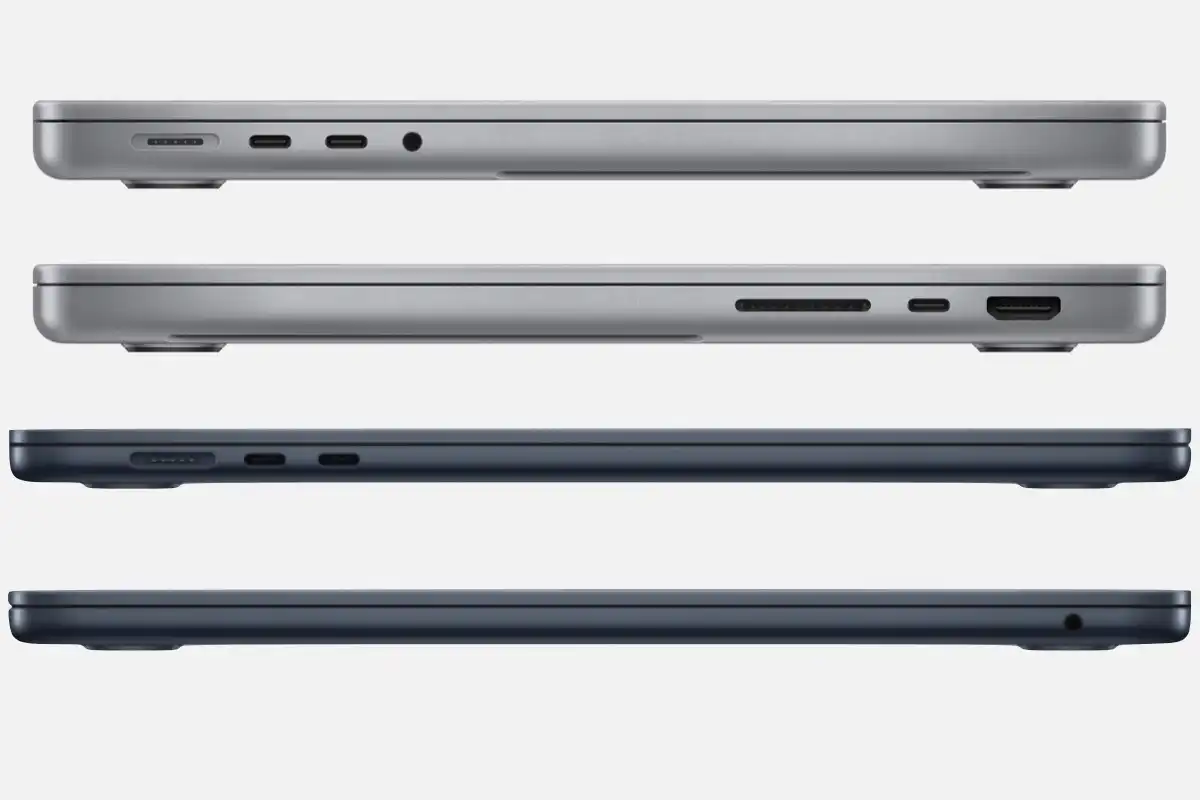
- Ports and Connectivity: MacBook Air offers two Thunderbolt ports and MagSafe. MacBook Pro includes HDMI, SDXC card slot, multiple Thunderbolt ports, and headphone jack for direct connections to peripherals.
- Battery Life: Both deliver excellent endurance, but MacBook Pro often edges out slightly due to larger batteries and efficient chips.
- Weight and Portability: MacBook Air is lighter (around 2.7 lbs for 13-inch) and thinner, ideal for frequent travelers. MacBook Pro is heavier (3.4–4.8 lbs) but still portable.
- Price: MacBook Air starts lower, offering better value for moderate needs. MacBook Pro commands a premium for pro-grade capabilities.
These distinctions help clarify MacBook Pro vs MacBook Air when your work involves intensive tasks versus mobile productivity.
MacBook Air: Best for Mobile Professionals and Everyday Workflows
The MacBook Air (M4, 2025/2026 models) shines for professionals who prioritize lightness and all-day usability. Available in 13-inch and 15-inch sizes, it handles web browsing, document editing, video calls, light photo editing, and coding with ease.
Developers running multiple IDEs, consultants managing spreadsheets, or marketers creating presentations find the M4 chip more than capable. Its fanless design ensures zero noise during client meetings or quiet offices. Battery life often reaches 18+ hours, perfect for full days without outlets.
The slim profile fits easily into briefcases or backpacks, making it ideal for frequent flyers or hybrid workers. Up to 24GB unified memory and 2TB storage support smooth multitasking.
Pros:
- Ultra-portable and lightweight design
- Silent operation with no fans
- Excellent battery life for on-the-go work
- Affordable entry into Apple silicon performance
- Sufficient for most office and light creative tasks
Cons:
- Limited sustained performance under heavy loads
- Fewer ports require adapters for some setups
- Standard display lacks Pro-level brightness and refresh rate
This model suits writers, teachers, salespeople, and entry-level creatives debating MacBook Pro vs MacBook Air.
MacBook Pro: The Choice for Demanding Professional Workloads
The MacBook Pro (M5 series, 2026) targets professionals needing uncompromising power. The 14-inch and 16-inch models feature M5, M4 Pro, or M4 Max chips, delivering exceptional multi-core performance for video editing, 3D rendering, software development, and data science.
Active cooling maintains peak speeds during long exports or compiles. The Liquid Retina XDR display excels in color-critical work like photography and design, with high brightness for outdoor use. Extra ports reduce dongle dependency, streamlining setups with external drives or monitors.
Battery life remains impressive, often surpassing 20 hours, while supporting fast charging. Configurations reach 128GB memory and 8TB storage for massive projects.
Pros:
- Superior sustained performance for intensive tasks
- Stunning XDR display with ProMotion technology
- More ports for professional peripherals
- Better speakers and microphone quality
- Ideal for creative and technical professionals
Cons:
- Heavier and thicker than Air
- Higher starting price
- Fans can be audible under load
Video editors, graphic designers, engineers, and developers often choose MacBook Pro in the MacBook Pro vs MacBook Air comparison.
Side-by-Side Comparison Table: MacBook Pro vs MacBook Air (2026 Models)
| Feature | MacBook Air (M4) | MacBook Pro (M5/M4 Pro/Max) |
|---|---|---|
| Starting Price | Around $999–$1,299 | Around $1,599–$2,499+ |
| Chip Options | M4 | M5, M4 Pro, M4 Max |
| Display | Liquid Retina (up to 500 nits) | Liquid Retina XDR (up to 1600 nits) |
| Refresh Rate | 60Hz | Up to 120Hz ProMotion |
| Cooling | Fanless | Active fans |
| Ports | 2 Thunderbolt, MagSafe | HDMI, SDXC, 3+ Thunderbolt, MagSafe |
| Weight (13/14-inch) | ~2.7 lbs | ~3.4 lbs |
| Battery Life | Up to 18+ hours | Up to 22+ hours |
| Best For | Portability, everyday pro tasks | Sustained heavy workloads, creatives |
This table simplifies the MacBook Pro vs MacBook Air decision for professionals evaluating specs.
Frequently Asked Questions
Which is better for professionals: MacBook Pro or MacBook Air in 2026?
It depends on your workload. Choose MacBook Pro for video editing, 3D modeling, or heavy coding requiring sustained performance. Opt for MacBook Air if you need portability for meetings, travel, or lighter tasks like document work and browsing.
Is the MacBook Air powerful enough for professional software like Adobe Suite or Xcode?
Yes, the M4 MacBook Air handles Adobe Photoshop, Premiere (light edits), and Xcode efficiently for most professionals. It may throttle during very long renders, where MacBook Pro excels.
Does MacBook Pro offer better value for creative professionals?
For demanding creative work involving color accuracy and high-res files, yes — the XDR display and extra power justify the cost in MacBook Pro vs MacBook Air debates.
Can MacBook Air replace MacBook Pro for developers?
For many developers running IDEs, VMs, and compiling code, the MacBook Air performs admirably and offers better portability and silence. Heavy multi-threaded builds favor MacBook Pro.
How long will these MacBooks receive software updates?
Both lines typically get 7+ years of macOS updates, ensuring long-term relevance for professional use.
These questions address common searches around MacBook Pro vs MacBook Air for better SEO.
Final Recommendation: MacBook Pro vs MacBook Air for Professionals
For most professionals in 2026, the MacBook Air (M4) delivers outstanding value and performance for everyday and moderate demands, making it the practical choice for mobility-focused roles. However, if your work involves intensive, sustained tasks — such as 4K/8K editing, complex simulations, or large-scale development — the MacBook Pro (M5 series) provides the edge in power, display quality, and connectivity.
Evaluate your daily tasks: if portability and silence matter most, go with MacBook Air. If maximum capability without compromises is key, invest in MacBook Pro. Both represent Apple’s excellence, ensuring reliable performance for years.