Remote work has become a permanent part of professional life, demanding tools that deliver reliable performance, seamless communication, strong security, and all-day battery life. Apple’s ecosystem stands out as a top choice for remote workers, offering devices that integrate effortlessly, run optimized apps, and support hybrid workflows with minimal setup.
From freelancers managing client calls to corporate teams collaborating across time zones, the right Apple device can boost focus, reduce downtime, and enhance productivity. In 2026, with Apple Intelligence powering smarter task management and enhanced connectivity, selecting the best Apple devices for remote work becomes easier than ever.
This comprehensive guide explores the top Apple devices suited for remote professionals, compares their strengths, and provides practical recommendations. Whether you need a powerful laptop for heavy tasks or a portable tablet for quick meetings, you’ll find the ideal setup here.
Why Apple Devices Are Ideal for Remote Work
Apple’s hardware and software create a cohesive environment perfect for remote professionals. macOS and iPadOS offer native support for tools like Zoom, Microsoft Teams, Slack, Google Workspace, and Notion. Features such as Continuity, Handoff, and Universal Control allow seamless switching between devices, so you can start a document on your iPhone, edit it on iPad, and finalize it on Mac.
Long battery life ensures uninterrupted work during power outages or travel. Built-in security, including end-to-end encryption and regular updates, protects sensitive client data. High-quality cameras and microphones deliver professional video calls, while quiet operation suits shared home offices.
Apple Intelligence adds value with features like email summarization, smart replies, and automated reminders, helping remote workers stay organized. These advantages make Apple devices for remote work a preferred choice for many professionals.
Key Features Remote Workers Need in Apple Devices
Focus on these essential elements when choosing your setup.
- Battery Life: At least 10-18 hours for full workdays without charging.
- Performance: Fast processors for multitasking, video calls, and light editing.
- Connectivity: Wi-Fi 6E/7, optional cellular, and multiple ports for peripherals.
- Camera and Audio: Sharp webcams and clear microphones for meetings.
- Display Quality: High-resolution screens to reduce eye strain.
- Portability: Lightweight designs for working from anywhere.
- Security and Privacy: Robust protection for confidential work.
- Ecosystem Integration: Smooth handoff between phone, tablet, and computer.
These priorities ensure the Apple devices for remote work you select match your daily routine.
Top Recommended Apple Devices for Remote Work in 2026
Apple’s current lineup offers options for every remote work style.
MacBook Air (M4, 13-inch or 15-inch): The Go-To Choice for Most Remote Workers
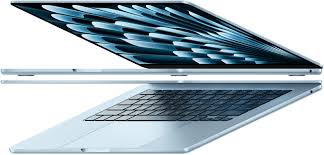
The MacBook Air with M4 chip remains the most popular pick for remote professionals. Its fanless design keeps it silent during calls, while up to 18 hours of battery life supports full workdays.
The Liquid Retina display provides crisp visuals for documents, spreadsheets, and presentations. With 16GB unified memory standard in many configurations, it handles dozens of browser tabs, Zoom, Slack, and document editing without slowdowns.
Pros:
- Extremely lightweight (under 3 lbs for 13-inch)
- Excellent keyboard and trackpad for extended typing
- Full macOS for desktop apps and multitasking
- Affordable with education or business pricing
Cons:
- Only two Thunderbolt ports (adapters needed for multiple peripherals)
- No touchscreen
Ideal for writers, marketers, consultants, and managers who need a reliable daily driver as one of the best Apple devices for remote work.
MacBook Pro (14-inch, M5): Powerhouse for Demanding Remote Tasks
For remote workers handling video editing, coding, graphic design, or data analysis, the 14-inch MacBook Pro with M5 chip delivers superior performance. The Liquid Retina XDR display offers exceptional brightness and color accuracy, perfect for creative reviews.
Active cooling maintains speed during long renders or compiles. More ports (HDMI, SD card slot, three Thunderbolt) reduce dongle use.
Pros:
- Sustained high performance for intensive apps
- Stunning display for professional-grade work
- Better audio and microphone quality for calls
- Up to 22+ hours battery life
Cons:
- Heavier than Air
- Higher price point
A favorite among creative freelancers and tech professionals using Apple devices for remote work.
iPad Pro (M5, 11-inch or 13-inch): Ultimate Portable Workstation
The 2026 iPad Pro with M5 chip and Tandem OLED display transforms into a powerful remote work tool when paired with Magic Keyboard and Apple Pencil Pro. iPadOS 26 introduces desktop-like windowing and enhanced external display support.
It excels for note-taking, quick annotations, and mobile meetings.
Pros:
- Ultra-light and thin for travel
- Touch and Pencil input for diagrams or reviews
- Cellular option for work anywhere
- Stunning OLED screen for presentations
Cons:
- Keyboard feels less comfortable for all-day typing
- Some pro apps have limitations compared to macOS
Perfect for consultants, educators, and creatives who value flexibility in Apple devices for remote work.
iPad Air (M4): Balanced Tablet for Everyday Remote Tasks
The iPad Air offers similar versatility at a lower price. It handles email, documents, video calls, and light editing efficiently.
Pros:
- Affordable with strong performance
- Lightweight and portable
- Great battery life
Cons:
- No OLED display
- Less power than Pro
A solid choice for budget-conscious remote workers.
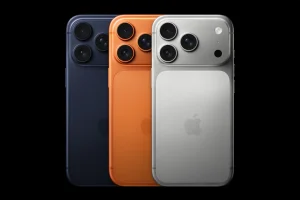
iPhone 17 Pro or iPhone 17: Essential Mobile Companion
No remote setup is complete without a reliable smartphone. The iPhone 17 series provides excellent cameras for on-the-go photos, strong 5G/Wi-Fi, and Continuity features for instant handoff.
Pros:
- Always-on connectivity
- High-quality video calls
- Apple Intelligence for quick replies
Use it as a secondary device for calls and notifications.
Comparison Table: Best Apple Devices for Remote Work
This table helps compare options for Apple devices for remote work.
Frequently Asked Questions
What is the best Apple device for remote work in 2026?
The 13-inch MacBook Air with M4 chip offers the best balance of performance, portability, battery life, and price for most remote professionals handling daily tasks.
Can an iPad Pro replace a MacBook for remote work?
Yes, for many users, especially with Magic Keyboard and iPadOS 26. It excels in mobility and touch tasks but falls short for heavy desktop workflows or prolonged typing.
Which Apple device has the best battery life for remote work?
The MacBook Air and MacBook Pro lead with 18–22 hours, making them ideal for long work sessions without outlets.
Should remote workers buy an iPhone alongside their Mac or iPad?
Absolutely. iPhone provides instant notifications, hotspot connectivity, and Continuity features that enhance the entire setup.
Are Apple devices secure enough for remote corporate work?
Yes, with end-to-end encryption, biometric authentication, and frequent security updates, they meet high standards for business use.
These FAQs address common remote work questions for better SEO.
Conclusion: Building Your Ideal Remote Work Setup with Apple Devices
The best Apple devices for remote work in 2026 depend on your role and preferences. For most professionals, the MacBook Air M4 provides unbeatable everyday performance. Creatives and power users benefit from the MacBook Pro, while mobile-first workers thrive with iPad Pro or Air.
Combine devices for maximum efficiency: MacBook as primary workstation, iPad for portability, and iPhone for constant connectivity. With Apple’s ecosystem, you’ll stay productive, secure, and connected no matter where work takes you.